Promotion Sync
Promotion Sync
Section titled “Promotion Sync”Route: /connections/:id/marketing
Tutorial ID: marketing
Breadcrumb: Marketing · See also: Product Settings.
Purpose
Section titled “Purpose”Promotion Sync manages how Shopify discounts are synced to TikTok Shop promotions. Shopify is the source of truth: create and edit discounts in Shopify Admin first.
Silk Connector pulls discount data from Shopify, syncs eligible promotions to TikTok Shop, tracks sync status, and lets you retry or ignore failed promotions.
| Where to go | What you do there |
|---|---|
| Marketing → Promotion Sync | View discounts, filter the list, pull from Shopify, export CSV, sync, unsync, retry, or ignore. |
| Settings → Product → Discounts | Enable automatic promotion sync and select supported promotion types. |
| Home → Tasks or Monitoring → Background Tasks | Track promotion sync jobs and line-item results. |
Related guides: Product pull and sync and category configuration are covered in the Product and Category user guides. This guide covers the Marketing promotion list only.
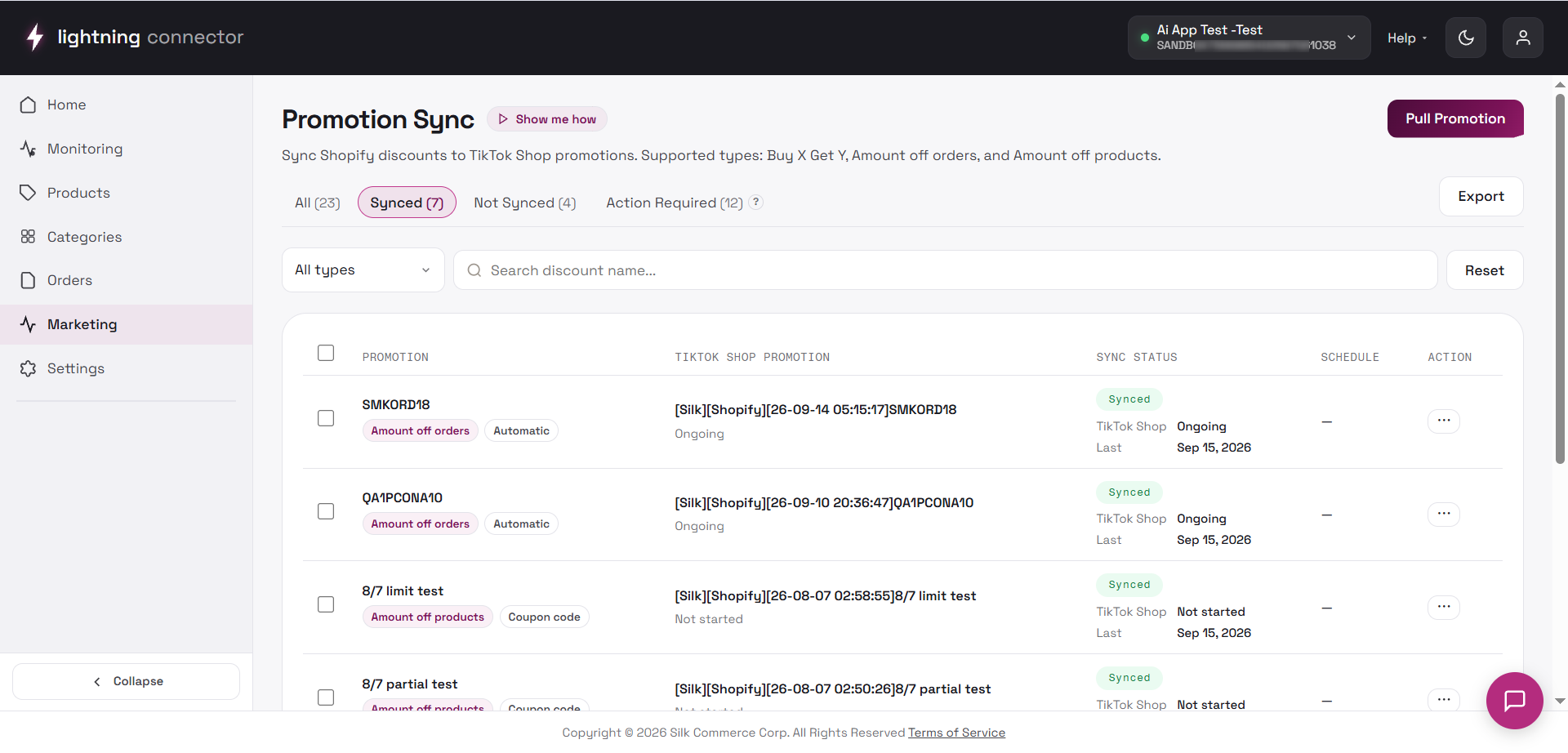
Promotion Sync page
Section titled “Promotion Sync page”Header
Section titled “Header”| Control | Behavior |
|---|---|
| Show me how | Opens the in-app help drawer for this page. |
| Pull Promotion | Pulls the latest discounts from Shopify into the Promotion Sync list. |
Status tabs
Section titled “Status tabs”Tabs filter the list; counts reflect the current server totals, not only the current page.
| Tab | Shows |
|---|---|
| All | Every promotion for this connection. |
| Synced | Discounts successfully synced to TikTok Shop. |
| Not Synced | Promotions not synced, unsynced, ignored, or currently unsupported. |
| Action Required | Promotions that failed or require review before another attempt. |
Toolbar and filters
Section titled “Toolbar and filters”| Control | Behavior |
|---|---|
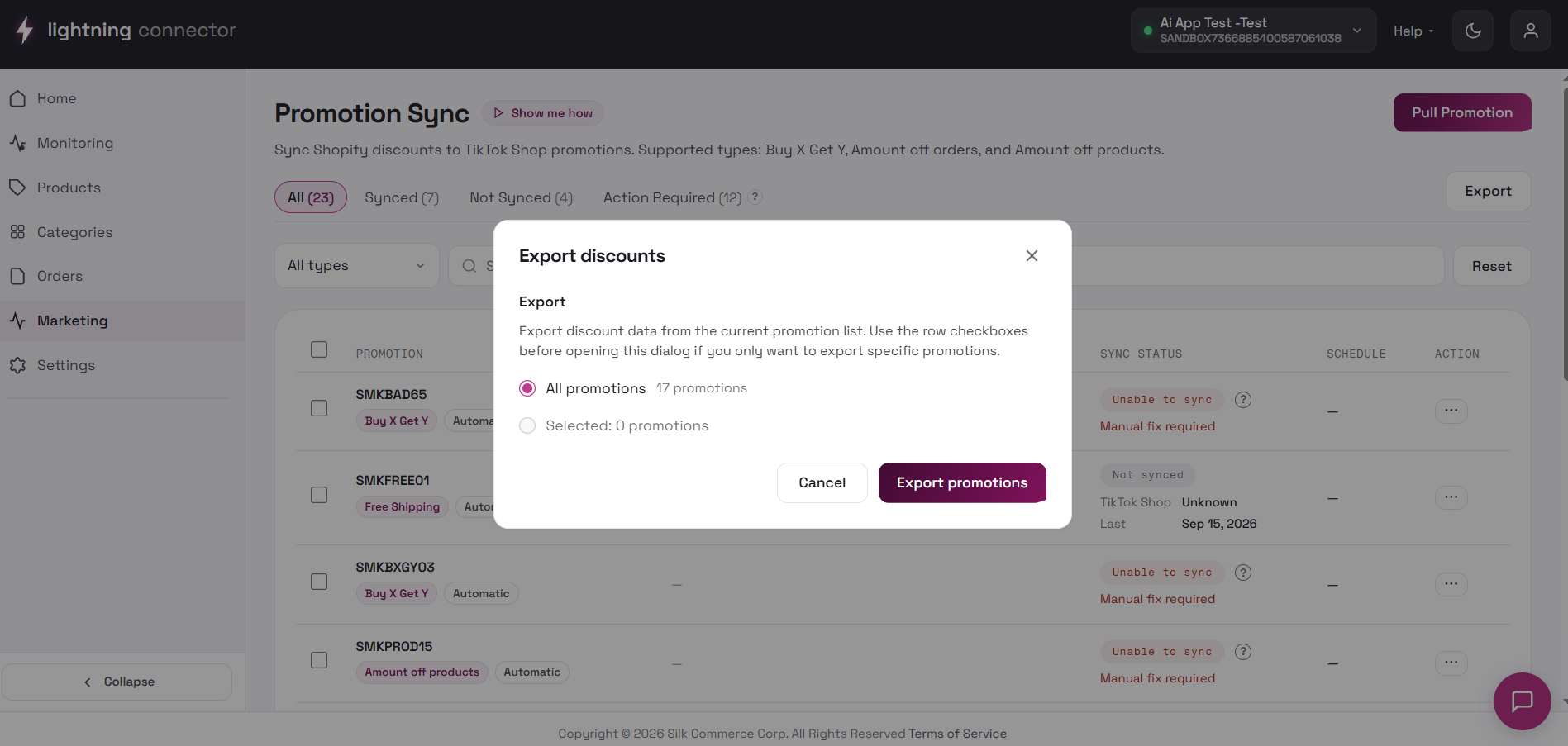
| Export | Download promotions as CSV for all promotions, the current filtered list, or selected rows. |
| Promotion type | Filter by Amount off products, Amount off orders, or Buy X Get Y. |
| Search | Search by discount name. |
| Reset | Clear search and filters and return to the first page. |
List columns
Section titled “List columns”| Column | Content |
|---|---|
| Checkbox | Select rows for CSV export. |
| Promotion | Shopify discount name, type, and method. |
| TikTok Shop Promotion | Promotion title on TikTok Shop after sync. |
| Sync Status | Synced, Not Synced, or Action Required, with additional details when available. |
| Schedule | Active dates for the discount. |
| Action | Available actions for the promotion. |
Use pagination at the bottom when the list is long.
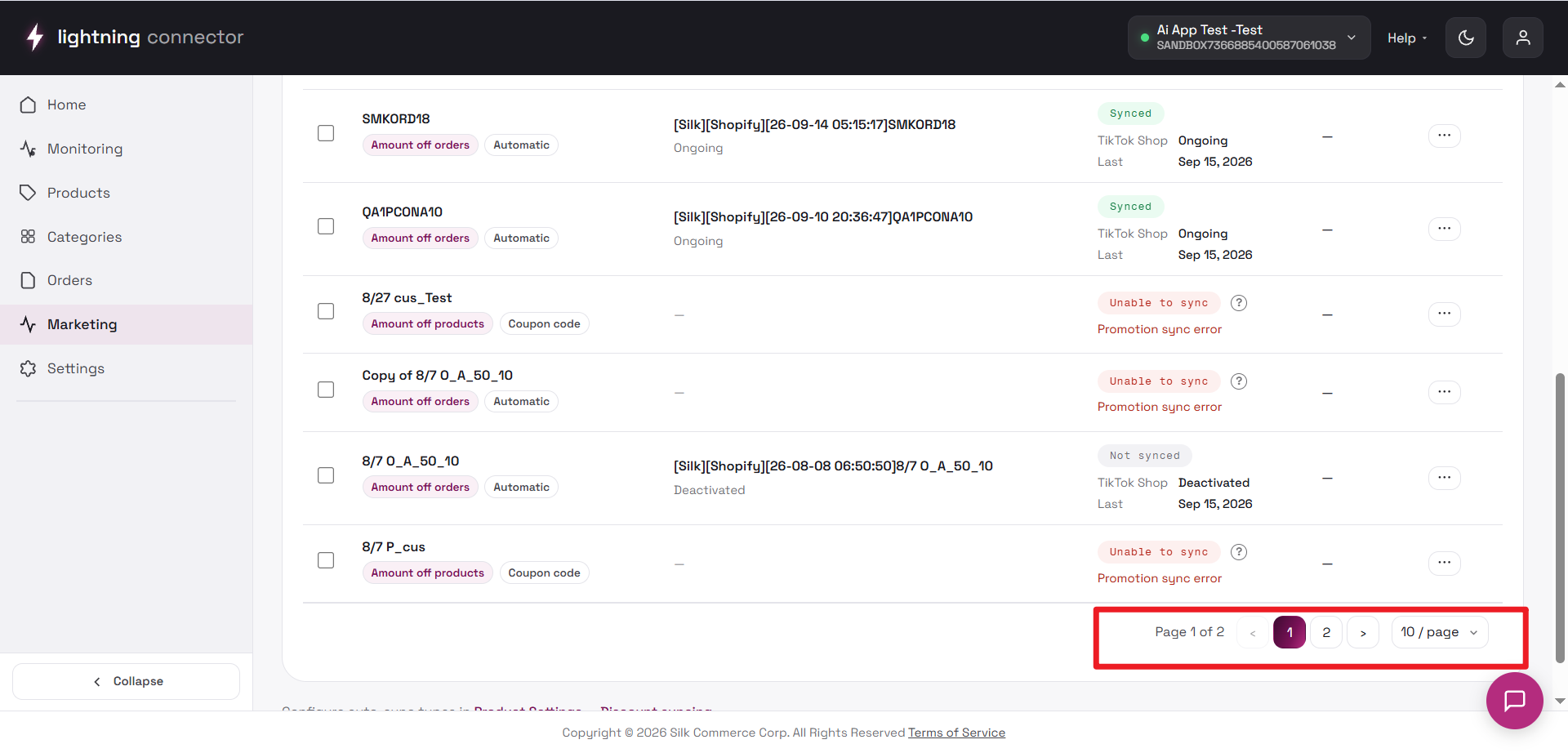
Row actions (three-dot menu)
Section titled “Row actions (three-dot menu)”Available items depend on sync status:
| Status | Typical actions |
|---|---|
| Not Synced | Sync queues a sync task. |
| Synced | Unsync deactivates the linked TikTok Shop promotion while keeping the Shopify discount. |
| Action Required | Retry starts another attempt; Ignore moves it to Not Synced without syncing. |
| Any status with an ID | Open the promotion in TikTok Shop or Shopify. |
Retry depends on the issue: Confirming a medium-risk combination warning allows another attempt, but does not guarantee success. Retry cannot override unsupported settings or promotion conflicts.
Ignore does not sync the promotion: Ignore moves the promotion from Action Required to Not Synced. You can manually sync it again later after reviewing or updating the promotion.
Automatic sync
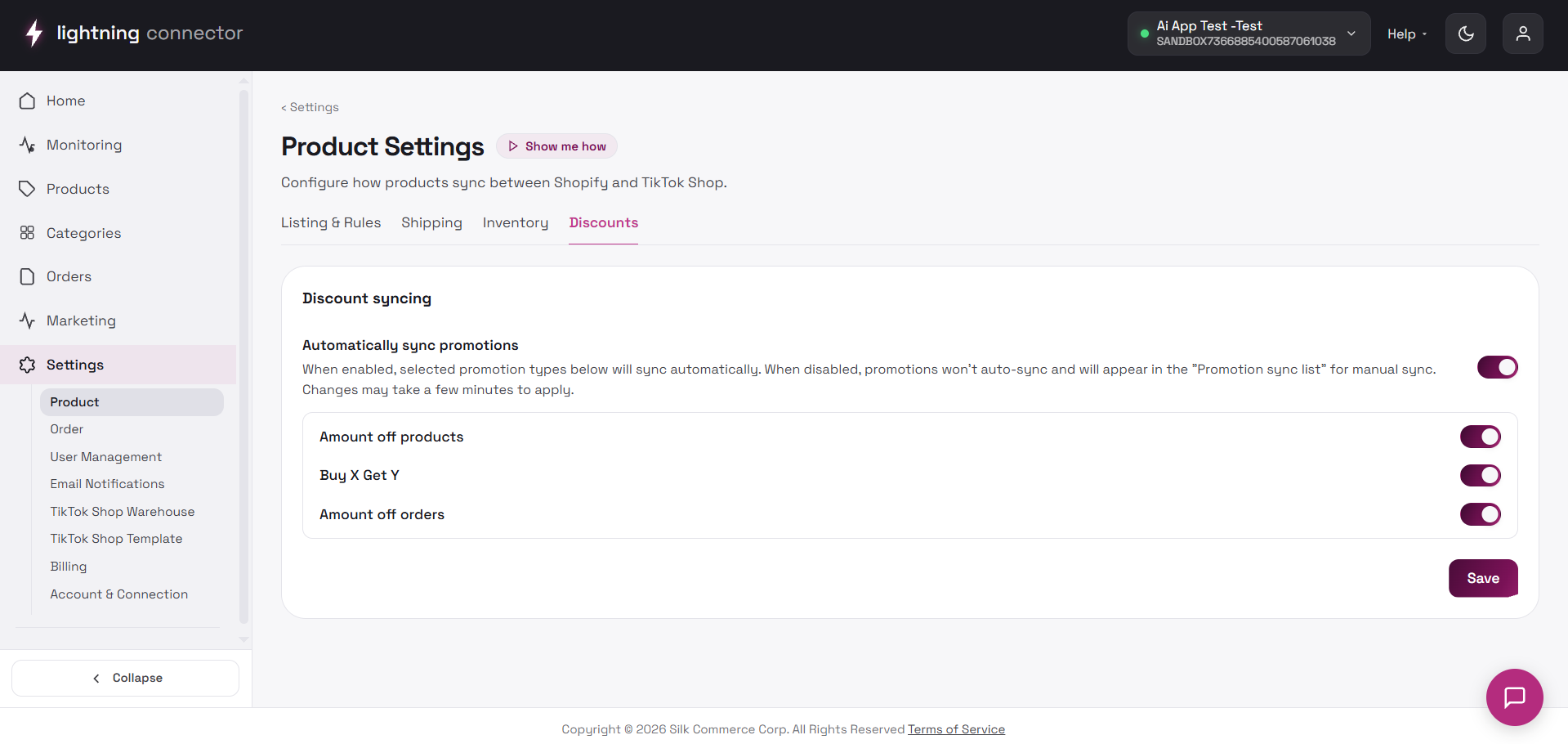
Section titled “Automatic sync”Open Settings → Product and select the Discounts tab.
Master switch: Automatically sync promotions
Section titled “Master switch: Automatically sync promotions”| Master switch | Effect |
|---|---|
| ON | Supported promotion type switches are enabled. Only selected types participate in automatic sync. |
| OFF | Automatic sync is disabled. New eligible promotions can still be synced manually from Promotion Sync. |
Supported automatic promotion types
Section titled “Supported automatic promotion types”When the master switch is on, configure these supported automatic promotion types:
- Amount off products.
- Amount off orders.
- Buy X Get Y.
Free Shipping is not currently supported for Promotion Sync.
Automatic sync still checks whether a promotion meets the supported rules. Promotions that cannot be synced or require review appear as Action Required.
When automatic sync is OFF, you can still manually sync a new eligible promotion. However, later changes made to an already synced Shopify promotion are not pushed through a separate manual Update action.
When automatic sync is ON, changes to an already synced eligible Shopify promotion are processed automatically. If an update fails, review the reason before retrying.
Supported types and rules
Section titled “Supported types and rules”Supported promotion types
Section titled “Supported promotion types”| Shopify discount type | Typical TikTok Shop mapping |
|---|---|
| Amount off orders | Supported Automatic Discount → Buy More Save More (order-level). |
| Amount off products | Supported Automatic Discount → Buy More Save More (selected products). |
| Buy X Get Y | Supported Automatic Discount → TikTok Shop BXGY. |
| Free Shipping | Not currently supported for Promotion Sync. |
Promotion Sync currently supports Automatic Discounts. Discount Code promotions are not supported and do not create a TikTok Shop promotion. Buy X Get Y can use Free, Percentage Discount, or Fixed Amount Discount for Y when the other rules are met.
Common validated rules
Section titled “Common validated rules”Current confirmed rules include:
- Promotion title must be 16 characters or fewer.
- For Buy More Save More percentage discounts, the supported percentage range is 5%–60%.
- Products in product-level promotions must already be available on TikTok Shop.
- Some targeting, usage, and purchase-type settings are not supported. For example, Subscription-only promotions are not supported.
- Supported rules can vary by promotion type. A rule for Buy More Save More may not apply to Buy X Get Y in exactly the same way.
When a promotion cannot be synced, read the status reason first. Depending on the issue, update the Shopify discount and Retry, or use Ignore to leave it as Not Synced.
Combination and stacking behavior
Section titled “Combination and stacking behavior”Product Discount / Buy X Get Y medium-risk confirmation
Section titled “Product Discount / Buy X Get Y medium-risk confirmation”When the store already has another Product Discount or Buy X Get Y promotion and the current promotion does not allow Product Discount combinations, the promotion may enter Action Required for review instead of being blocked immediately.
After reviewing and confirming the risk, use Retry to continue the sync attempt. You can also choose Ignore to move it to Not Synced, then manually Sync it again later.
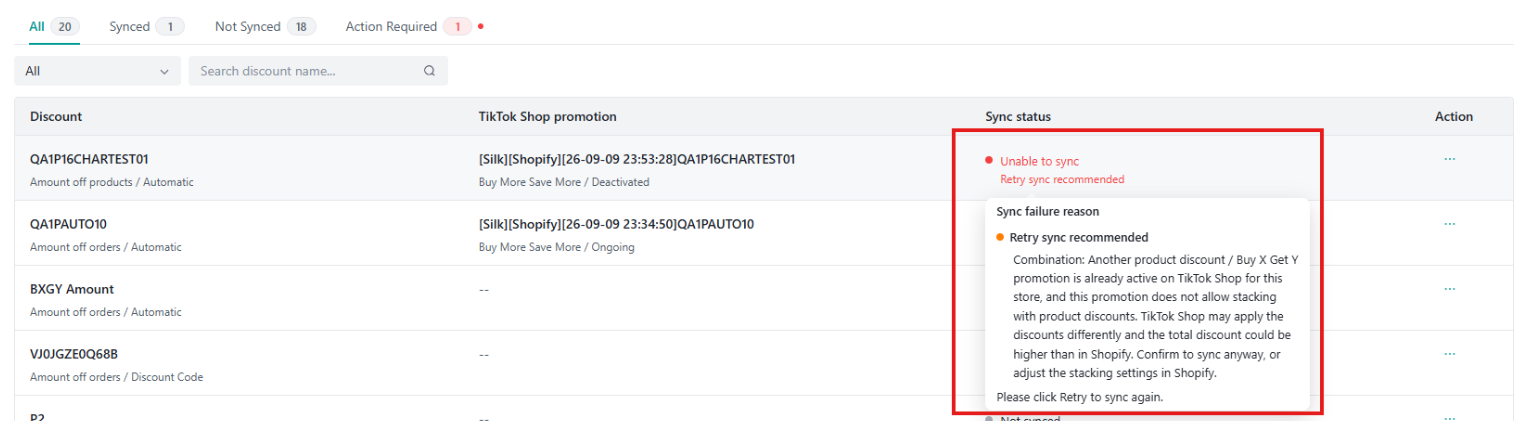
Confirmation allows another attempt: Confirming the risk allows another sync attempt, but it does not guarantee that the promotion can be synced successfully.
Shopify Combination settings do not always guarantee a successful sync
Section titled “Shopify Combination settings do not always guarantee a successful sync”Even when Shopify allows promotions to be combined, some promotion combinations may still conflict with existing TikTok Shop promotions.
If a promotion cannot be synced because of a conflict:
- The promotion remains or returns to Action Required.
- Review the promotion details and existing active promotions.
- Adjust the Shopify promotion or conflicting promotion when necessary.
- Retry the sync.
Sync order can affect Order vs Product/Buy X Get Y combinations
Section titled “Sync order can affect Order vs Product/Buy X Get Y combinations”The result can vary depending on the promotion type and sync order:
| Sync order | Observed behavior |
|---|---|
| Product Discount / BXGY first → Amount off orders second | Can sync normally when the remaining rules are satisfied. |
| Amount off orders first → Product Discount / BXGY second | The later Product/BXGY promotion may receive a TTS mutually-exclusive conflict and fail to sync. |
The result may vary depending on the promotion type, existing TikTok Shop promotions, and sync order.
Other common blockers
Section titled “Other common blockers”Common blockers include:
- Unsupported targeting, usage limits, or purchase types.
- Products not yet available on TikTok Shop.
- Promotion title or discount percentage outside supported ranges.
- Product/Buy X Get Y Combination risk that requires review.
- Conflicts with existing TikTok Shop promotions.
- Other unsupported promotion settings.
Retry does not guarantee a successful sync if the promotion configuration is still unsupported or conflicting. Review and update the promotion when required, then retry.
Synced promotions on TikTok Shop often use an auto-generated title prefix such as [Silk][Shopify][YY-MM-DD HH:mm:ss]{Original Discount Name}.
Pull and export
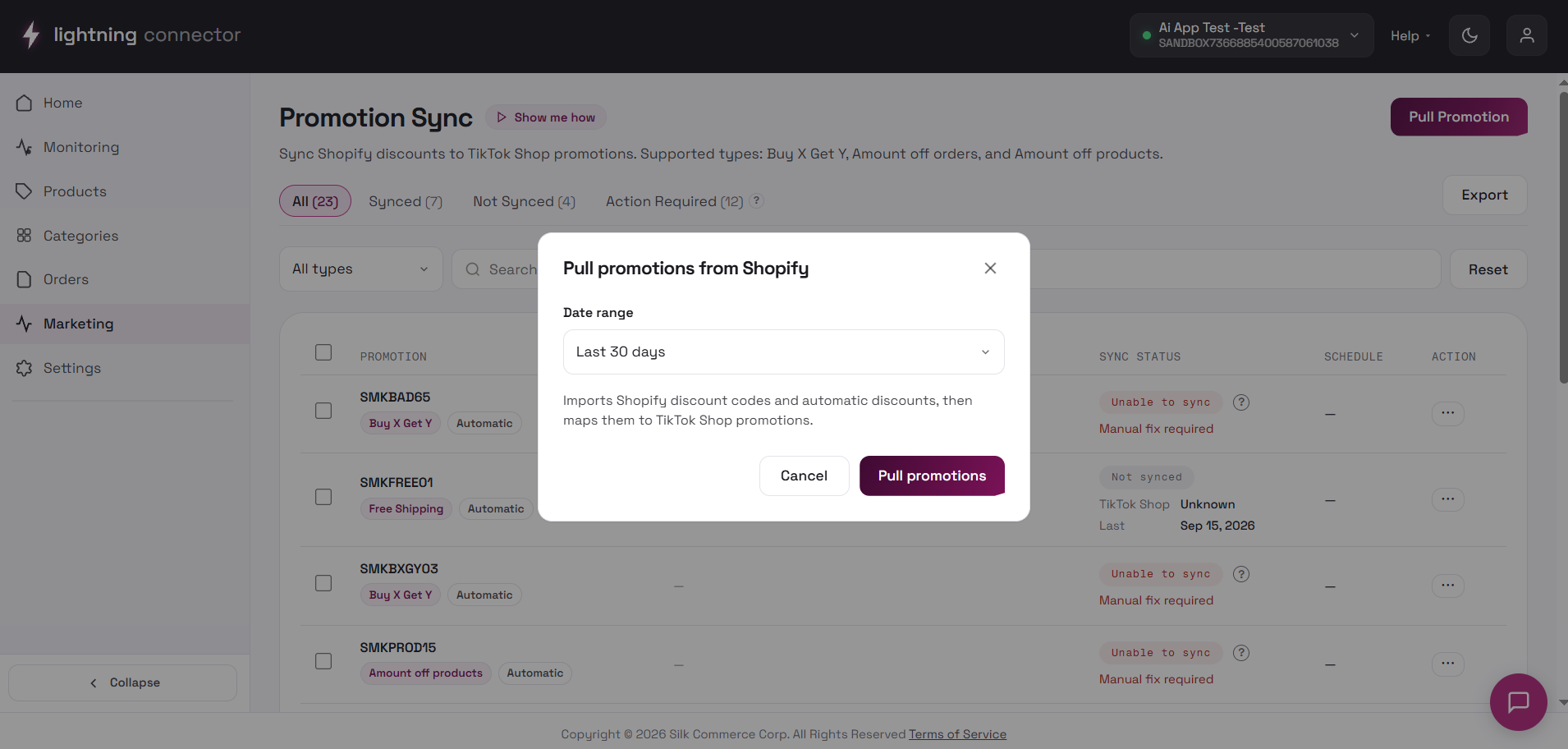
Section titled “Pull and export”Pull Promotion refreshes the Promotion Sync list with the latest Shopify discounts. It does not sync a promotion to TikTok Shop unless automatic sync is enabled for that type or you manually select Sync.
Export produces a CSV for all promotions, the current filtered list, or selected promotions.
Quick start
Section titled “Quick start”- Optionally enable automatic sync under Settings → Product → Discounts and choose supported types.
- Create or update an eligible Automatic Discount in Shopify Admin.
- Open Marketing → Promotion Sync and use Pull Promotion when the list is not current.
- For Not Synced promotions, select Sync or wait for automatic sync when enabled.
- Track progress under Home → Tasks or Monitoring → Background Tasks.
- For Action Required, review the reason before continuing:
- For a medium-risk Combination warning, review and confirm the risk, then Retry; or choose Ignore and manually sync later.
- For an unsupported setting or promotion conflict, update the promotion when required, then Retry.
- If the promotion still fails, review active TikTok Shop promotions and the sync order.
Will every discount sync automatically?
Section titled “Will every discount sync automatically?”No. Automatic sync must be enabled, and the promotion must be a selected, supported Automatic Discount type. Free Shipping and Discount Code sync are not currently supported.
Can I manually sync when automatic sync is off?
Section titled “Can I manually sync when automatic sync is off?”Yes. A new eligible Not Synced promotion can still be manually synced. Turning Auto Sync off mainly means later Shopify changes are not automatically pushed to an already synced promotion.
What does Ignore do?
Section titled “What does Ignore do?”Ignore moves an Action Required promotion to Not Synced without syncing it. You can update it and manually sync it again later.
Does Retry always make the promotion sync successfully?
Section titled “Does Retry always make the promotion sync successfully?”No. Retry starts another sync attempt. It can be used after confirming a medium-risk Combination warning, but it does not override unsupported settings or promotion conflicts.
Why can a promotion still fail when Shopify allows combinations?
Section titled “Why can a promotion still fail when Shopify allows combinations?”Shopify Combination settings do not guarantee that the same promotion combination can be used on TikTok Shop. A promotion may still fail to sync if it conflicts with another active promotion.
Why can the same promotions behave differently depending on sync order?
Section titled “Why can the same promotions behave differently depending on sync order?”The result can depend on which promotion already exists. For the confirmed Order vs Product/Buy X Get Y scenario, syncing Product/Buy X Get Y first and Amount off orders second can work, while syncing Amount off orders first may cause the later Product/Buy X Get Y promotion to conflict and fail.
Where do I fix a failed sync?
Section titled “Where do I fix a failed sync?”Read the status detail and task result first. If the issue comes from the Shopify promotion settings, select Open in Shopify, adjust the discount, then Retry. If the promotion conflicts with an existing TikTok Shop promotion, review the active promotions and sync order before retrying.
This guide reflects the current C4 Plus Promotion Sync behavior. Promotion results may vary depending on promotion type, existing TikTok Shop promotions, and sync order.