Order Settings
Route: /connections/:id/settings/order
Tutorial ID: settings-order
Breadcrumb: Settings → Order Settings · See also: Manage Orders
Purpose
Section titled “Purpose”Control order sync automation from TikTok Shop to Shopify, Shopify order attribute defaults, and shipping carrier / option mappings that fix many “carrier not mapped” issues on Manage Orders.
| Tab | URL ?tab= | Content |
|---|---|---|
| Order Sync | sync (default) | Toggle switches (auto-save on change) |
| Order Attributes | attributes | Payment method, channel, contact email |
| Shipping Mapping | shipping | Provider + option mapping tables |
Legacy URLs ?tab=shipping-provider and ?tab=shipping-option open Shipping Mapping.
Before you change toggles
Toggles apply to new and retried sync attempts. They do not rewrite historical Shopify orders. Stuck orders may need Refresh Order on Manage Orders. If a toggle reverts immediately, the API rejected the value.
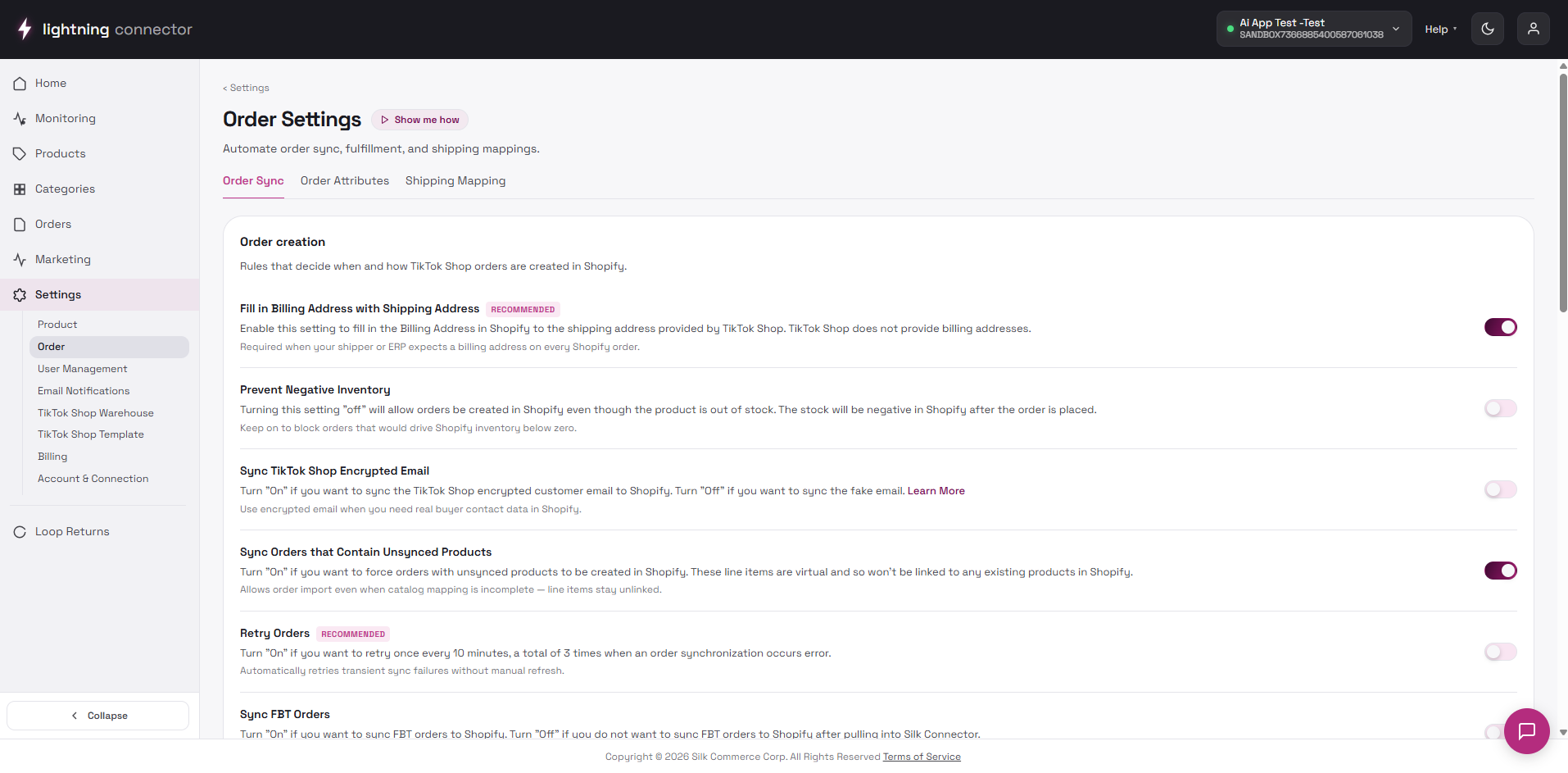
Order Sync tab
Section titled “Order Sync tab”Each toggle saves immediately when changed. On failure, the switch reverts and a toast explains the error.
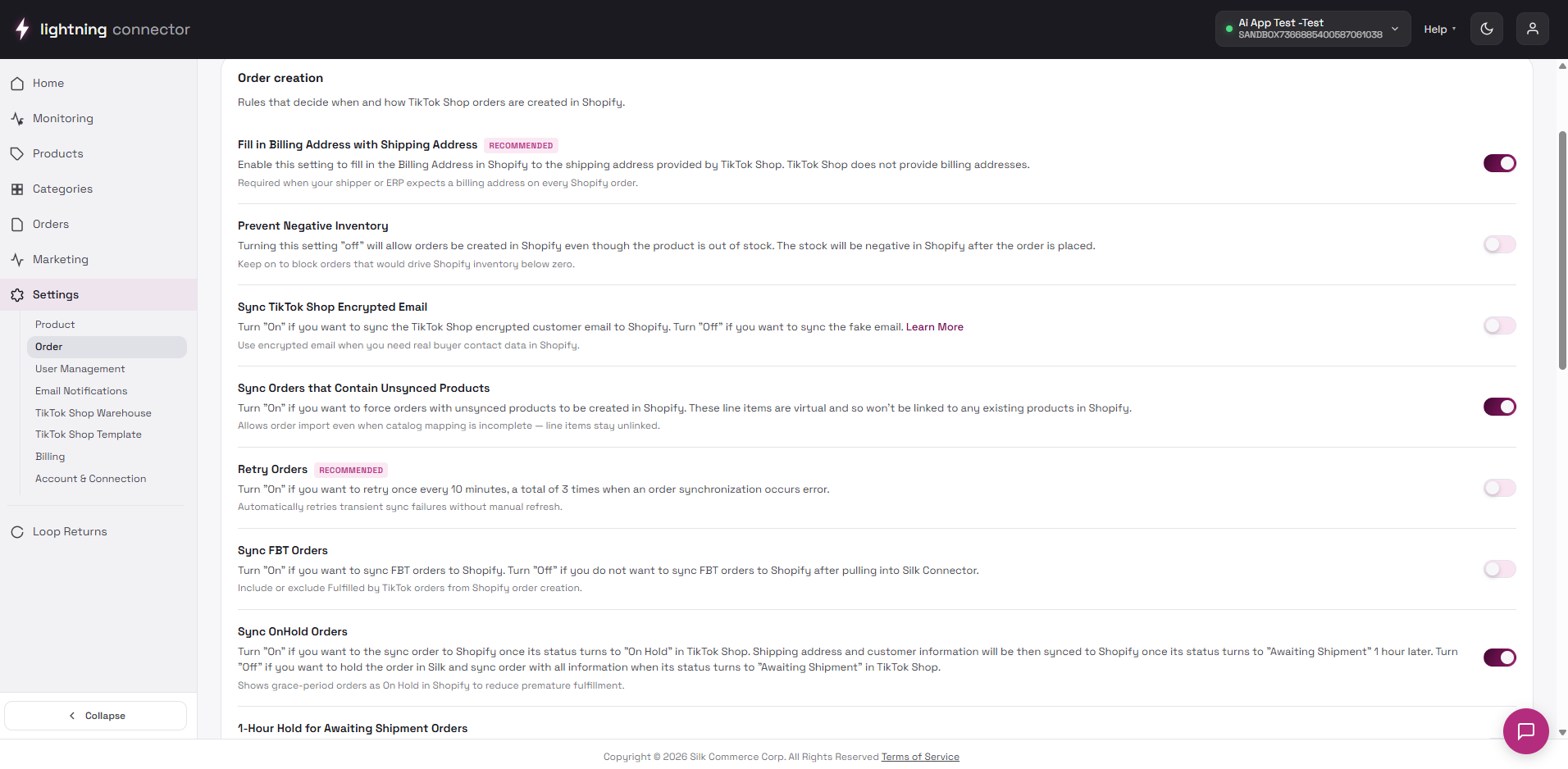
Order creation
Section titled “Order creation”| Toggle | When ON | When OFF |
|---|---|---|
| Billing address | Shopify order uses shipping address for billing | Billing may be empty or separate |
| Prevent negative inventory | Sync blocks or adjusts when Shopify stock would go negative | May allow oversell risk on sync |
| Encrypted email | TikTok privacy email flows to Shopify order | Email field may differ or be omitted |
| Unsynced products | Orders with unmapped SKUs still create in Shopify | Order may fail until products mapped |
| Retry orders | Failed syncs retry on a schedule | Failures stay until manual refresh |
| Sync FBT orders | FBT program orders import to Shopify | FBT orders may stay TTS-only |
| Sync OnHold orders | On Hold TTS orders appear in Shopify early | Wait until Awaiting Shipment |
| 1-Hour hold | Delays sync to Shopify for certain awaiting-shipment paths | Faster sync; less grace for edits |
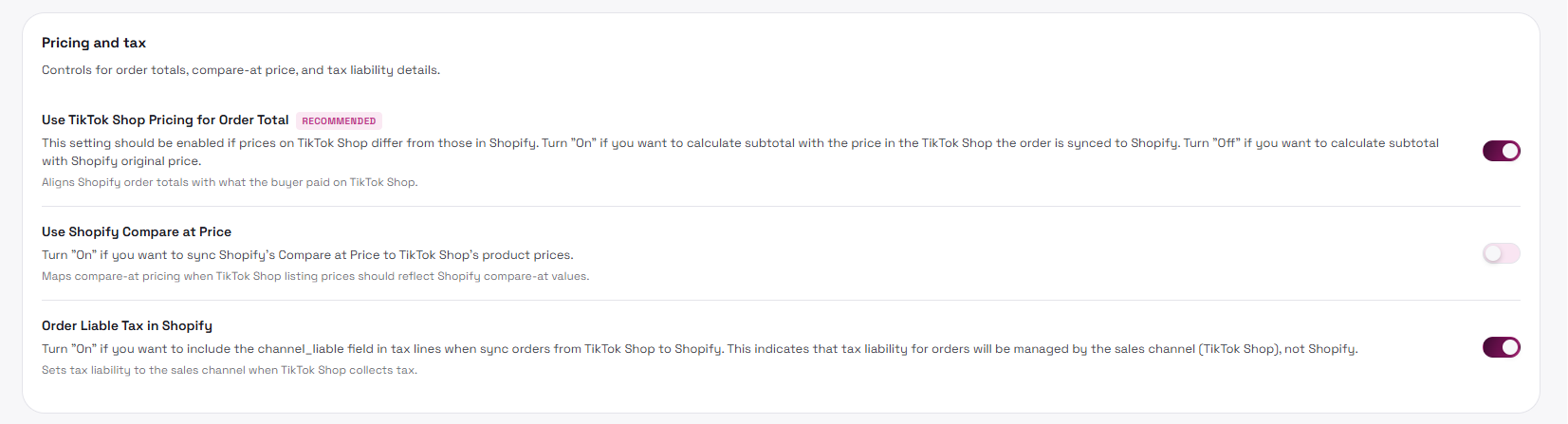
Pricing and tax
Section titled “Pricing and tax”- TTS pricing — line totals follow TikTok Shop prices
- Compare at price — compare-at from Shopify where applicable
- Order liable tax — tax lines include channel liability metadata
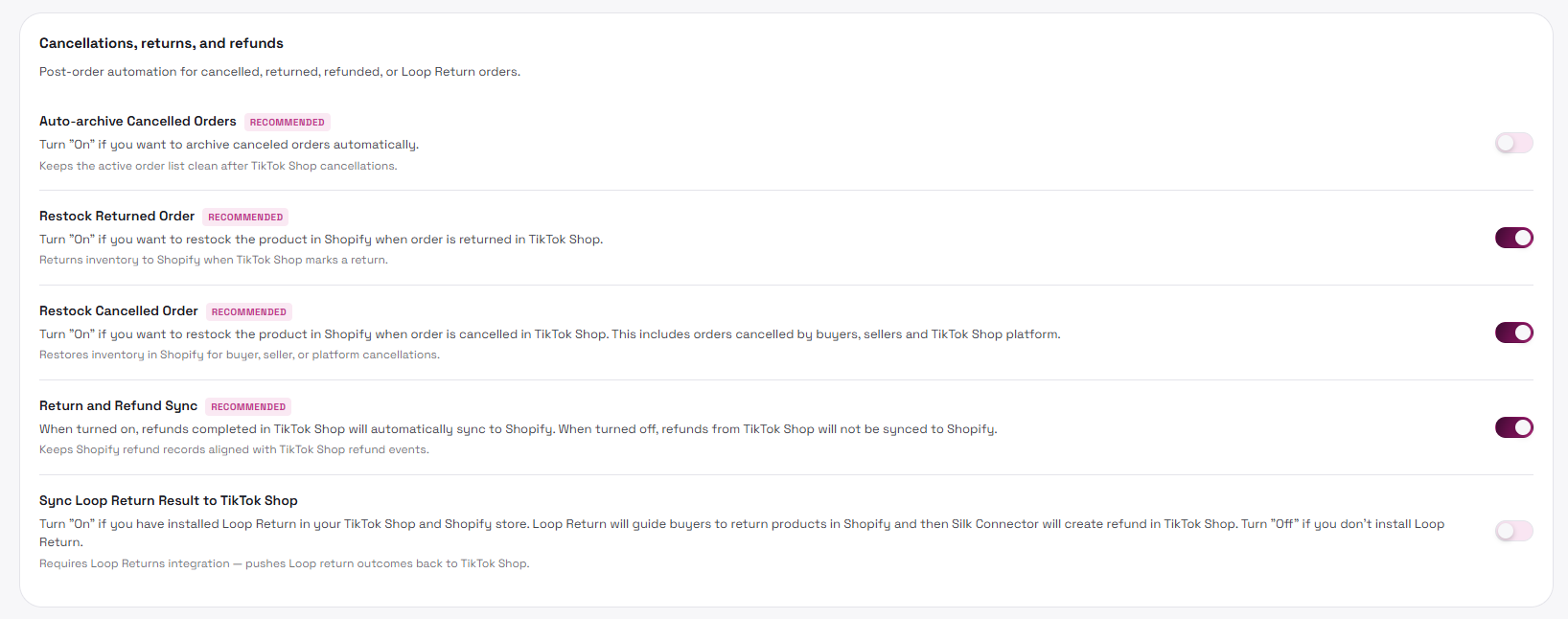
Cancellations, returns, and refunds
Section titled “Cancellations, returns, and refunds”- Auto-archive cancelled — keeps Manage Orders clean when TTS cancels
- Restock return / cancel — inventory return on refund/cancel paths
- Return and refund sync — keeps TTS and Shopify refund states aligned
- Loop Return — sends Loop Returns outcomes back to TikTok (rolls back if unsupported)
Order Attributes
Section titled “Order Attributes”Free-text fields written to Shopify orders: Payment Method, Channel, and Contact Email. Click Save once after editing all fields.
These values are stamped onto new Shopify orders created by sync. They do not retroactively change old orders. Use consistent values your finance team expects (e.g. channel = TikTok Shop).
Shipping Mapping (Required)
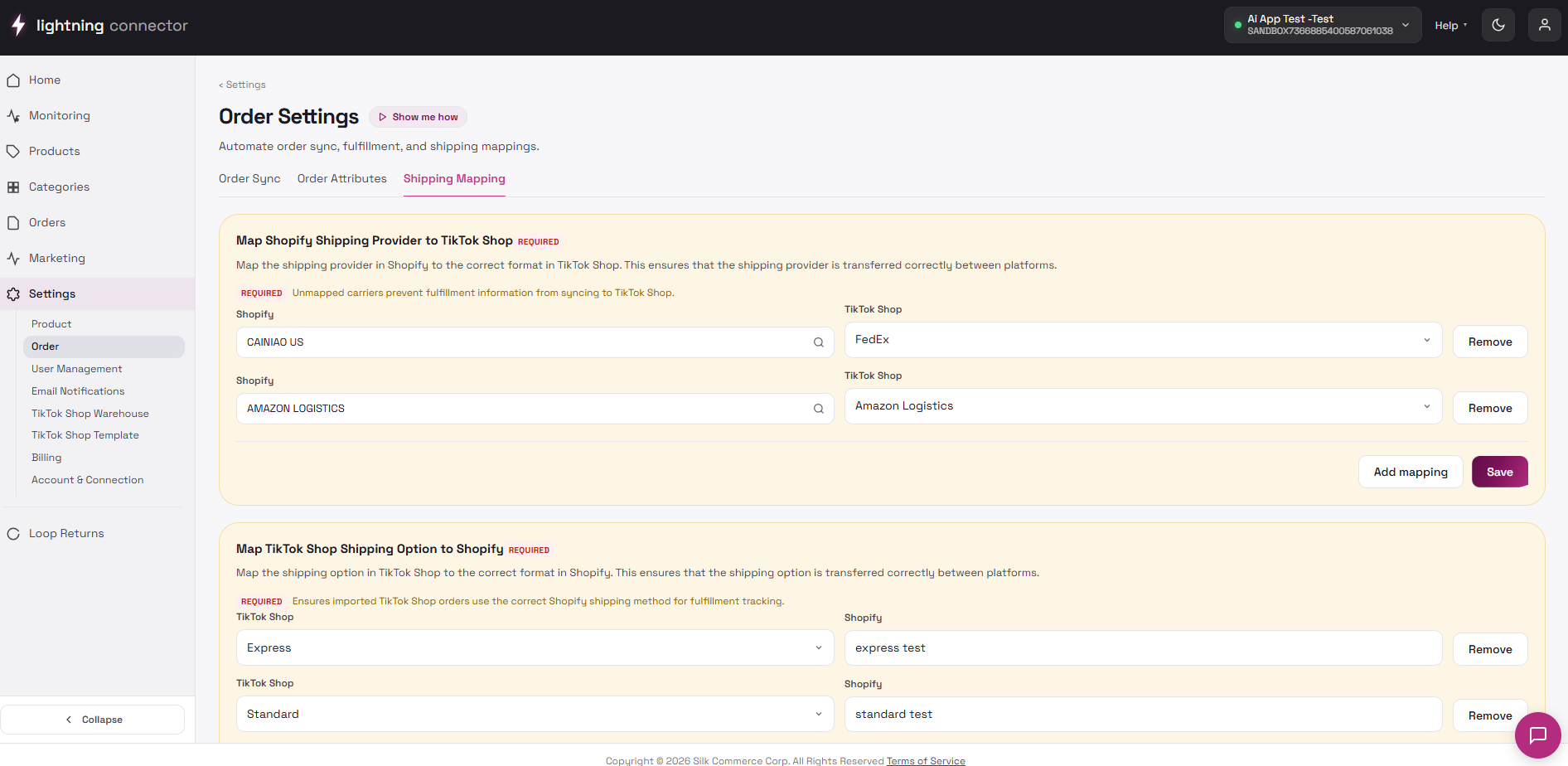
Section titled “Shipping Mapping (Required)”Fixes Carrier not mapped and shipping option mismatches on Manage Orders. Use this tab for any Need attention row mentioning carrier, shipping method, or provider — or before go-live.
Map Shopify shipping provider
Section titled “Map Shopify shipping provider”- Open a failing order on Manage Orders and note the Shopify shipping method (or carrier name in the issue text).
- Go to Shipping Mapping → provider table.
- Add mapping — Shopify side ↔ TikTok Shop carrier (loaded live from TikTok).
- Save, then Refresh Order on affected rows.
Map TikTok Shop shipping option to Shopify
Section titled “Map TikTok Shop shipping option to Shopify”Add a row: TikTok option ↔ Shopify option text (exact spelling matters). Duplicates on the TikTok column block save. Then refresh affected orders.
When Order setup spotlight is active: Back to Product settings and Finish setup & go to Home (saves shipping mappings first). Manage Orders may link here from issue rows (Fix carrier mapping).
Tips / common issues
Section titled “Tips / common issues”- Loading order settings… / Loading shipping provider options… — wait; check the TikTok Shop connection if providers never load.
- Toggle flips back — read the toast; the API may reject an unsupported combination.
- Orders still show a carrier issue — add a mapping for the Shopify method on the order, then Refresh Order.