Get Started
Route: /connections/:id/get-started
Tutorial ID: get-started
See also: Billing, Connections, and Shared reference (onboarding step tutorials).
Purpose
Section titled “Purpose”Complete the 7-step checklist to authorize stores, configure TikTok Shop prerequisites, pull products, and launch the connection.
Who can use it: Owner and Member. Subscription checkout during onboarding requires the Owner (Members should ask the Owner to subscribe).
Overview workflow
Section titled “Overview workflow”- Open Get Started from the Connections list or after creating a connection.
- Review the progress bar and plan summary strip: Current plan / Subscription pending, plus a Manage link to Billing.
- Steps unlock sequentially; complete step N before step N+1 becomes clickable.
- Expand a step to see actions. Each step has a Show Me How link to its onboarding tutorial.
- When all steps before Complete setup are done, click Launch connection.
- On launch, you are redirected to Settings → Product for the post-onboarding settings spotlight, then into normal operations.
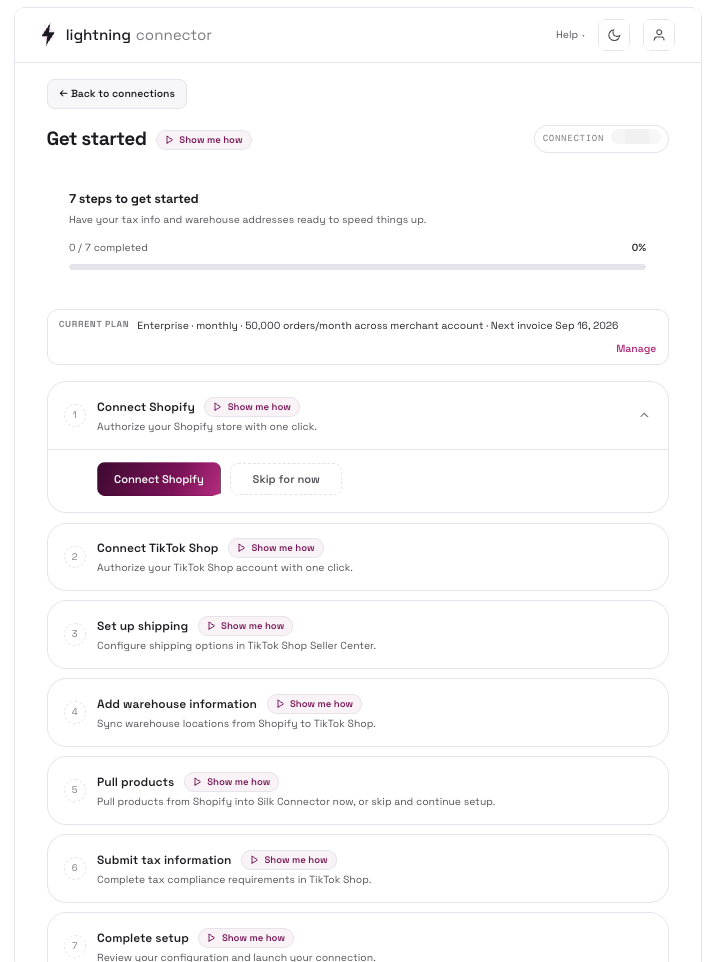
Each step
Section titled “Each step”| # | Step | What to do | Tutorial ID |
|---|---|---|---|
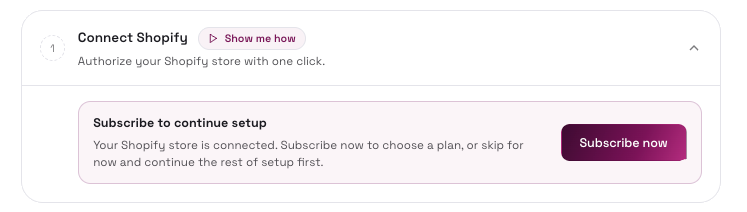
| 1 | Connect Shopify | Click Connect Shopify, complete Shopify OAuth, then return to Get Started. After Shopify connects, choose Subscribe now (opens billing checkout) or Skip for now (continue setup and subscribe later). | onboarding-shopify |
| 2 | Connect TikTok Shop | Click Connect TikTok Shop and complete TikTok Shop OAuth. | onboarding-tiktok |
| 3 | Set up shipping | Click Go to TikTok Shop shipping settings (opens Seller Center in a new tab), configure shipping, then Mark as complete. | onboarding-shipping |
| 4 | Add warehouse information | Click Go to TikTok Shop warehouse settings (opens Seller Center), configure warehouses, then Mark as complete. | onboarding-warehouse |
| 5 | Pull products | Click Pull Products to open the filter modal, or Skip for Now (when feature flag enabled). Options: filter by status, collection, date range; enable auto-sync after pull. | onboarding-pull-products |
| 6 | Submit tax information | Complete tax compliance in TikTok Shop Seller Center, then Mark as complete. | onboarding-tax |
| 7 | Complete setup | Review configuration and click Launch connection. | onboarding-complete |
Billing sub-flow
Section titled “Billing sub-flow”This flow appears after Shopify connect if the connection is not subscribed.
| State | Banner | Actions |
|---|---|---|
| Pending confirmation (Owner) | Complete your Shopify subscription | Continue in Shopify or Skip for now |
| Pending confirmation (waiting) | Waiting for Shopify confirmation | The page auto-polls; wait for Shopify to confirm. |
| Subscribed | Current plan strip | Manage → Billing |
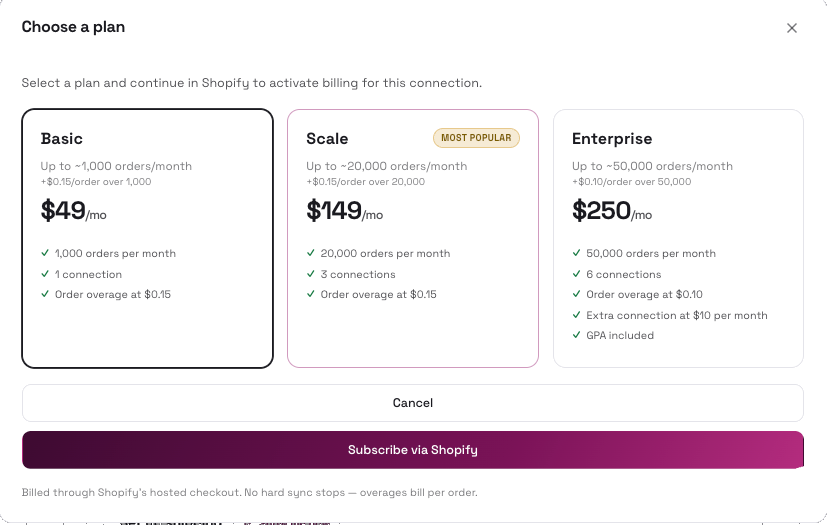
Choose a plan modal (from Subscribe now):
- Toggle Monthly billing.
- Select a plan card (Basic, Scale, Enterprise).
- Click Subscribe via Shopify or Continue in Shopify (when resuming pending approval).
Completion
Section titled “Completion”- When all steps are done: All steps completed! → Go to Connection Home.
- Launch connection navigates to
/connections/:id/settings/product(settings setup guide spotlight).
Tips / common issues
Section titled “Tips / common issues”- If you leave Get Started after setup is already complete, the page auto-redirects to Home.
- Subscribe now during step 1 sends you to
/billing/checkoutwith a return URL back to Get Started. - External TikTok Shop steps (shipping, warehouse, tax) require you to actually configure Seller Center before marking complete; otherwise order/product sync may fail later.
- Tag auto-pull (Silk TikTok Shop tag in Shopify) can take a few hours; manual pull is immediate.
- Use ← Back to connections if you need to switch connections mid-setup.
- During onboarding, the sidebar collapses to Settings → Billing only. Other settings routes redirect to Billing until onboarding is complete.